Introduction
Curve-BStrands is a Blender add-on for making hair strand texture atlases: the sheets of baked hair that game and real-time characters wear on hair cards.
You build bstrands – locks of hair grown from curves – shape them with a stack of procedural modifiers (curl, braid, clump, layers and more), colour and comb them, and bake the whole sheet into ten texture maps. Curve-BStrands then builds UV-ready cards that wear the atlas, or hands the layout to the companion add-on Agile Hair Cards.
Everything stays procedural until you decide otherwise. Change a slider and the strands rebuild; comb by hand and your edits ride on top of the modifiers instead of being wiped out by them.
What you can make
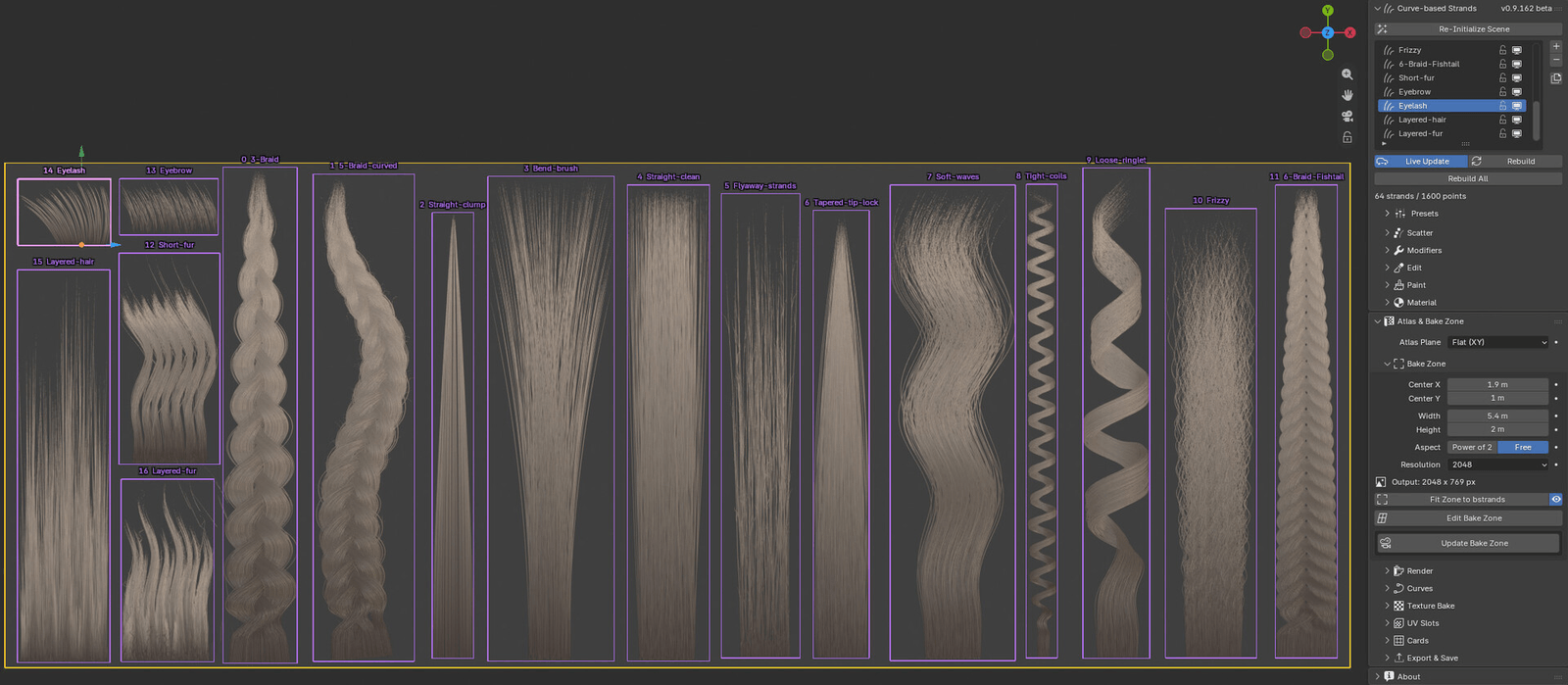
Section titled “What you can make”- Straight locks, tapered tips, clumped and layered haircuts
- Soft waves, tight coils, ringlets and frizz
- Braids and ropes with two to eight flows, including fishtails and braids that follow a curve
- Short and layered fur, eyebrows and eyelashes
- Flyaway and stray hairs growing out of any of the above
Features
Section titled “Features”- Curve-based strands. Every bstrand is a Blender Curves object, generated from its settings on every change.
- A free modifier stack. Curve, Bend, Curl, Braid, Noise, Clump, Layers and Stick Out, as many of each as you like, in any order.
- Masks and falloff curves on every modifier, along the strand and across the bstrand.
- 17 built-in presets in six groups, plus your own presets in your own groups.
- Hand editing that survives. Sculpt with Blender’s own curve brushes, capture the result as an edit layer, and keep changing the modifiers underneath.
- Paint directly on strands, with a colour wheel, palette and eyedropper.
- A 10-map bake: Albedo, Alpha, Specular, Depth, Normal, Root-Tip, Direction (flow), ID, Ambient Occlusion and Translucency, in EEVEE or Cycles, up to 8K.
- Bake zone tools: fit the zone to your strands, drag it in the viewport, and bake in power-of-two or free proportions.
- UV-ready cards and a UV layout export for Agile Hair Cards.
Requirements
Section titled “Requirements”| Blender | 5.1 or newer (tested on 5.1 and 5.2) |
| Render engine | EEVEE or Cycles |
| Operating system | Any system Blender 5.1 runs on |
| Hardware | A GPU is recommended for 4K and 8K bakes |
How it works
Section titled “How it works”A typical session goes through six stages. Each has its own chapter in this guide.
- Set up the scene with one click, so curves render with thickness and baked colours are not tone mapped.
- Create strands (called bstrands) from a preset or from scratch, and set their size and density in Scatter.
- Shape them with the modifier stack.
- Colour and edit them: a root-to-tip gradient, painting, and hand sculpting.
- Bake the bake zone into texture maps.
- Use the atlas: build UV-ready cards, or export the UV layout to Agile Hair Cards.
Terms used in this guide
Section titled “Terms used in this guide”| Term | Meaning |
|---|---|
| bstrand | One piece of hair you build: a Curves object made by Curve-BStrands. It appears in the Curve-based Strands list. |
| Lock | A bundle of strands inside a bstrand, held together by Clump or Layers. A bstrand is not a lock; it can hold many. |
| Atlas | The texture sheet all your bstrands are baked into. |
| Bake zone | The rectangle, outlined in yellow, that becomes the atlas. |
| Map | One baked texture, such as Albedo or Normal. |
| UV slot | The rectangle of the atlas a bstrand occupies, outlined in violet. |
| Card | A mesh plane that wears one UV slot of the atlas. |
| Across / along | Masks and curves work across a bstrand (left edge to right edge) or along each strand (root to tip). |
About this guide
Section titled “About this guide”This guide covers Curve-BStrands 0.9.163 beta.
Every control in the add-on also has a tooltip: hover over it in Blender for a short description.