Modifiers
How the stack works
Section titled “How the stack works”Modifiers shape the strands that Scatter creates. Click Add Modifier to put one at the end of the stack. You can add as many of each type as you like: a coarse Noise for the overall wave and a fine one for frizz on top is a common pair.
Modifiers are evaluated top to bottom, and the order changes the result. A Clump above a Curl gathers straight strands and then curls the clumps; a Clump below it gathers already-curled strands.
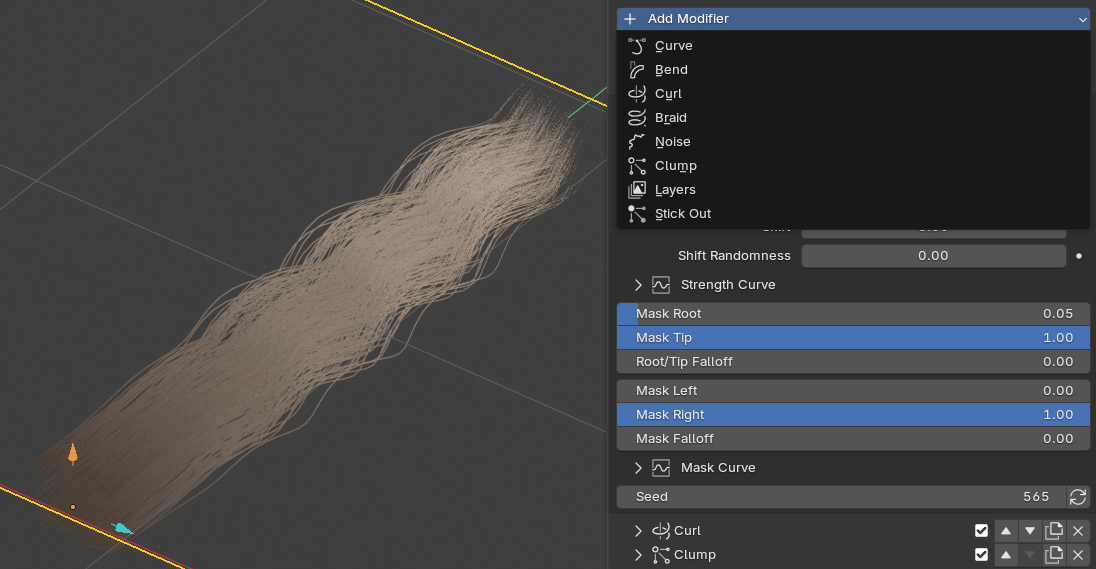
Every modifier’s header has:
| Control | What it does |
|---|---|
| Name | Click to rename it. |
| Checkbox | Turns the modifier off without deleting it. |
| ▲ / ▼ | Moves it up or down the stack. |
| Duplicate | Copies it, with its curves and guide, just below. |
| X | Deletes it, with its curves and guide. |
Controls every modifier has
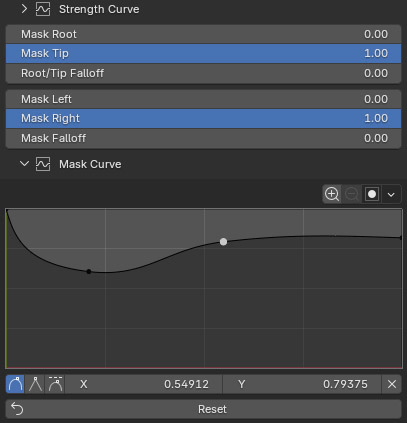
Section titled “Controls every modifier has”Masks limit where a modifier works. There are two independent windows.
| Control | What it does |
|---|---|
| Mask Root / Mask Tip | The part of each strand the modifier works on, from 0 (root) to 1 (tip). Mask Root above 0 keeps the roots planted. |
| Root/Tip Falloff | Softens the ends of that range instead of cutting hard. At 1.0, with only one end moved in, the modifier builds in smoothly over the whole range. |
| Mask Left / Mask Right | The part of the bstrand the modifier works on, from its left edge (0) to its right edge (1). |
| Mask Falloff | Softens the left and right edges. |
| Mask Curve | Draws the mask across the bstrand by hand. |
Profile curve
Section titled “Profile curve”Most modifiers have a curve named after their main control (Strength Curve, Scale Curve, Influence Curve, Gather Curve). It scales that control from root (left of the graph) to tip (right).
Seed and randomness
Section titled “Seed and randomness”Controls named … Randomness vary a value from strand to strand. Seed picks a different random pattern; click the button beside it to roll a new one.
Makes the whole bstrand follow a guide curve you edit like any Blender curve.
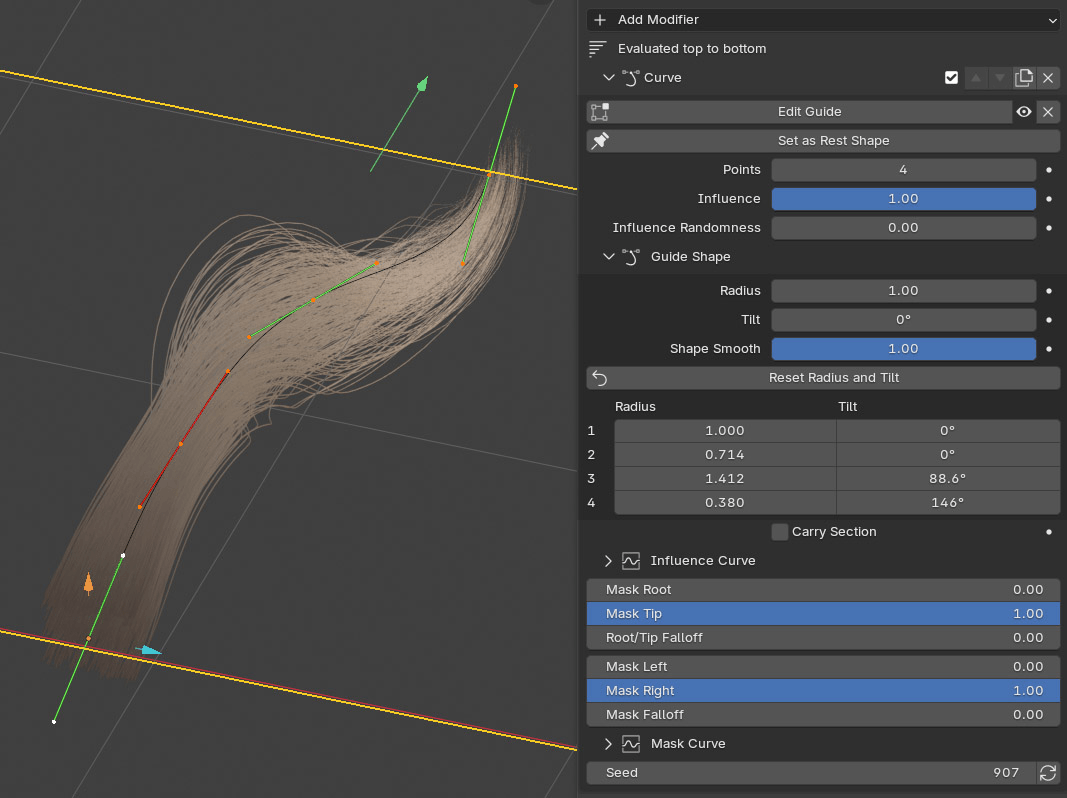
When you add a Curve modifier, a guide is created lying on the strands. Nothing moves until you edit the guide, and then only the change you make is applied.
| Control | What it does |
|---|---|
| Edit Guide | Selects the guide and enters Edit Mode. Move points, drag handles, extrude and subdivide; the strands follow as you work. |
| Eye | Hides the guide in the viewport. |
| Remove Guide / Add Guide Curve | Deletes the guide but keeps the modifier, or creates a new one. |
| Set as Rest Shape | Takes the guide’s current shape as its new neutral pose. |
| Points | The number of control points. Changing it keeps the shape you drew. |
| Influence / Influence Randomness | How closely the strands follow the guide. |
| Carry Section | Bends the bstrand as one body, so strands keep their place around its centre line. Turn it on for braids that follow a curve, so the plaits don’t crowd together on the inside of the bend. |
Guide Shape (collapsible) makes the bstrand thicker, thinner or twisted along the guide:
| Control | What it does |
|---|---|
| Radius | Scales the guide’s point Radius, so the bstrand thickens or thins around it. |
| Tilt | Twists the whole bstrand about the guide. |
| Shape Smooth | Eases Radius and Tilt through each control point instead of meeting at a corner. |
| Per-point table | Radius and Tilt for each control point. |
| Reset Radius and Tilt | Puts every point back to Radius 1 and Tilt 0. |
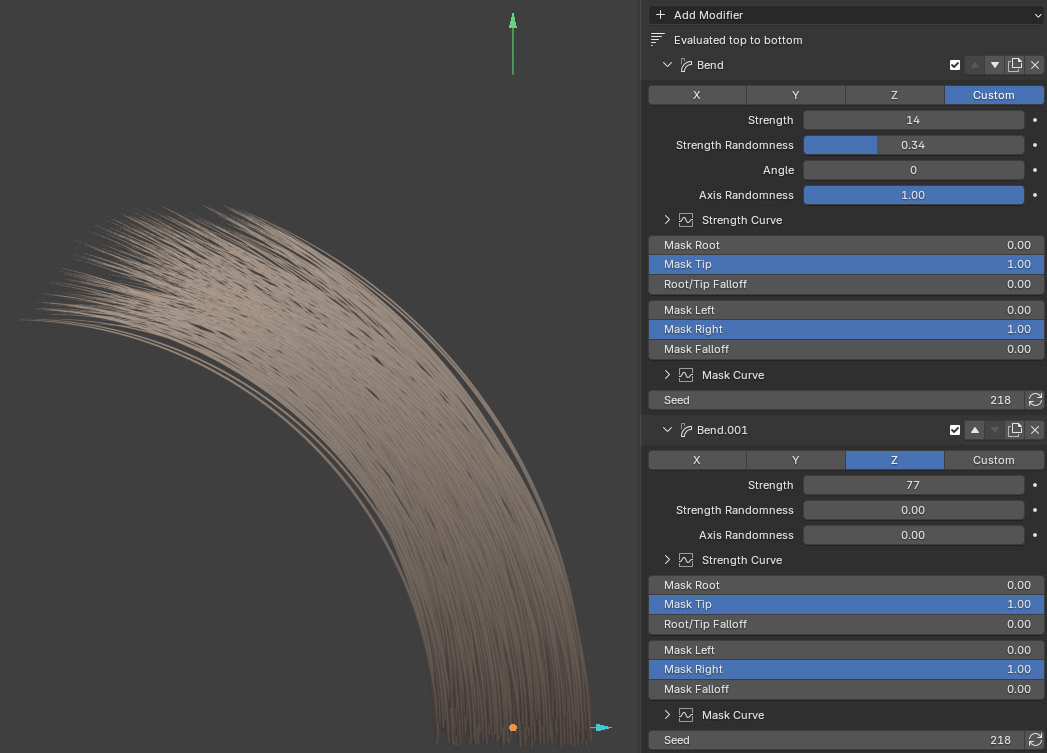
Sweeps the strands around an axis.
| Control | What it does |
|---|---|
| Axis | The world axis to bend around: X, Y, Z, or Custom. Picking the axis the strands grow along twists them instead. |
| Strength | Total bend over the strand, in degrees. |
| Strength Randomness / Axis Randomness | Varies the amount and the direction per strand. |
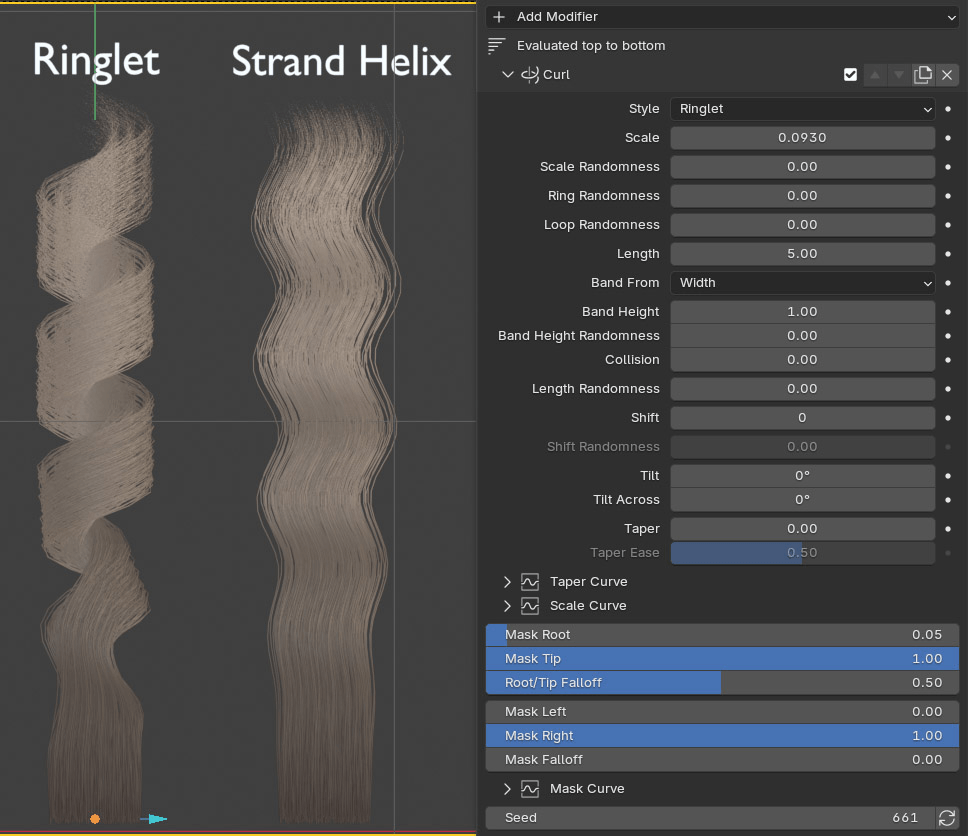
Coils the strands.
| Control | What it does |
|---|---|
| Style | Strand Helix: every strand coils about its own path, all in step. From the front it reads as a wave. Ringlet: the whole bstrand winds round one axis like hair round a curling iron. |
| Scale | Coil radius (for Ringlet, the radius of the iron). |
| Length | Number of coils over the strand. |
| Scale Randomness | Varies the radius from strand to strand. |
| Ring Randomness | Varies the radius from one ring to the next. |
| Loop Randomness | Gives each loop its own length, some drawn out and some tight. The number of turns stays the same. |
| Length Randomness | Varies the number of coils per strand. |
| Shift / Shift Randomness | Where along its turn each coil starts. |
| Tilt / Tilt Across | Leans the coil’s plane, so round rings become slanted ones. |
| Taper / Taper Ease | Closes the coil toward the tip. Taper Curve and Scale Curve shape the radius by hand. |
Ringlet only:
| Control | What it does |
|---|---|
| Band From | Which side of the bstrand becomes the band that wraps around: Width or Depth. Pick the bstrand’s long side. |
| Band Height | How tall each turn’s band is. Raise it for a fuller, smoother ringlet. |
| Band Height Randomness | Gives each turn its own band height. |
| Collision | Pushes strands of the band apart so none passes through another. |
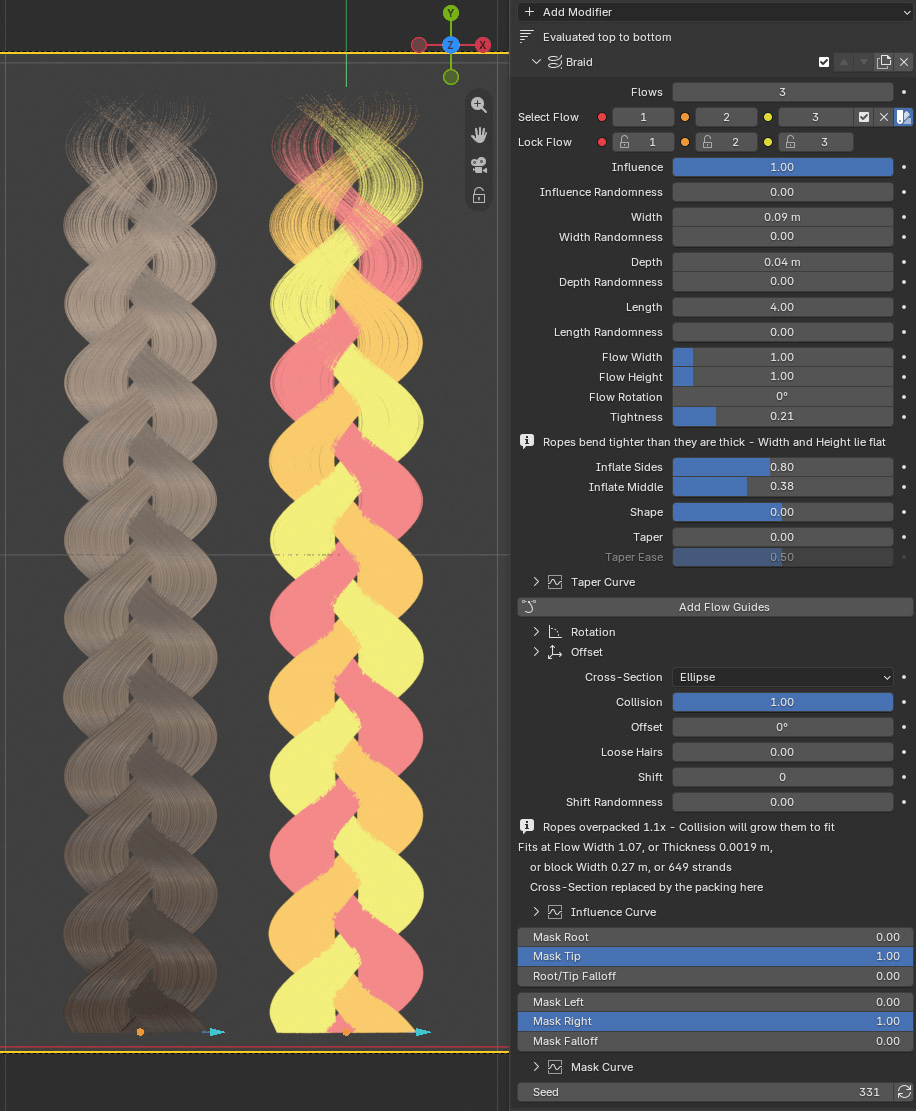
Splits the bstrand into ropes (flows) and weaves them.
| Control | What it does |
|---|---|
| Flows | How many ropes. One spirals on its own, two twist around each other, three or more weave. |
| Select Flow (1, 2, 3…) | Selects the strands of one rope, to sculpt that plait alone. |
| Preview Flows | Shows each rope in its own flat colour. |
| Lock Flow (1, 2, 3…) | Keeps a rope out of Edit Mode and sculpting. Braid settings still reshape it. |
| Control | What it does |
|---|---|
| Influence | Scales the whole braid. |
| Width | How far each rope swings from side to side. |
| Depth | How far each rope passes in front of and behind the others. |
| Length | Number of crossings over the strand. |
| Shape | Shares the braid’s length between lobes and crossings. Positive gives the lobes more; negative lingers in the crossings. |
| Offset | Extra spacing between one rope and the next; slides the crossings along. |
| Shift / Shift Randomness | Moves the strands along the weave. Shift Randomness gives each strand its own start, which loosens the plait. |
| Taper / Taper Ease | Narrows the plait toward its tip. Taper Curve shapes it by hand. |
Each of Influence, Width, Depth and Length has a Randomness partner.
| Control | What it does |
|---|---|
| Flow Width | How thick each rope is, as a multiple of its share of the bstrand. |
| Flow Height | How deep each rope is, as a multiple of Flow Width. Below 1 flattens it into a ribbon. |
| Flow Rotation | Turns each rope’s cross-section. Visible once a rope isn’t round. |
| Tightness | Squeezes each rope toward its centre. Higher values separate the plaits more clearly. |
| Inflate Sides / Inflate Middle | Fattens (or, negative, thins) a rope at the outer lobes or while it crosses the middle. |
| Cross-Section | Each rope seen end-on: Rectangle or Ellipse. Needs Depth Density above 1 in Scatter. |
| Collision | Pushes strands apart inside each rope until none overlap. The ropes grow to fit. |
| Loose Hairs | Lifts a few hairs clear of their rope, like strays in a real plait. |
If a rope holds more strands than it has room for, the panel warns that the ropes are overpacked and suggests the Thickness, Width or strand count that would fit.
Rotation and Offset (collapsible) turn or slide the ropes separately at the sides and in the middle of the plait, on the left or right, and per rope. Rotation Root, Rotation Tip and Rotation Falloff limit where along the strand the turn happens.
Flow guides
Section titled “Flow guides”Add Flow Guides gives every rope its own editable curve. Drag a guide’s points to move that rope alone, use a point’s Tilt to turn it, and its Radius to fatten it. Edit Flow Guides, Show Flow Guides and Remove Flow Guides appear once they exist.
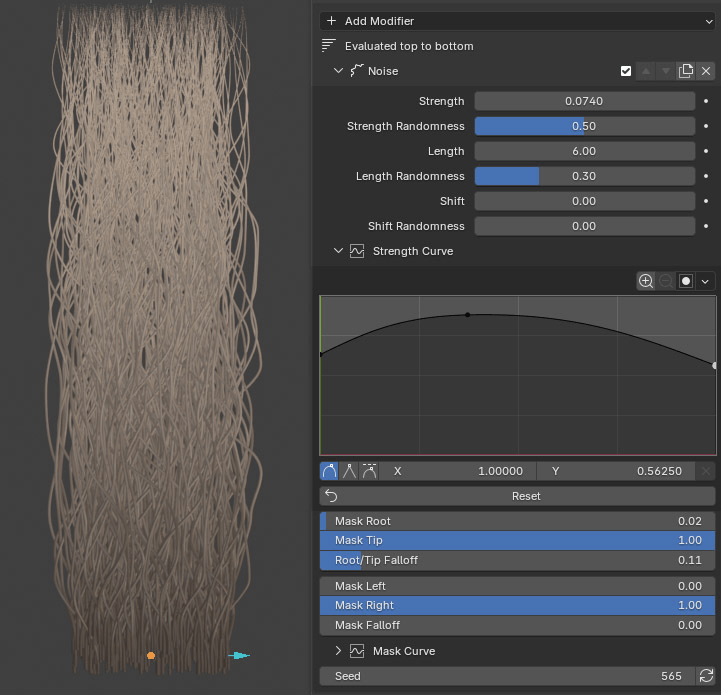
Adds a smooth, natural wobble along the strands.
| Control | What it does |
|---|---|
| Strength / Strength Randomness | How far the strands wander. |
| Length / Length Randomness | The frequency of the wobble along the strand. |
| Shift / Shift Randomness | Slides the noise pattern along the strand. Shift Randomness gives each strand its own. |
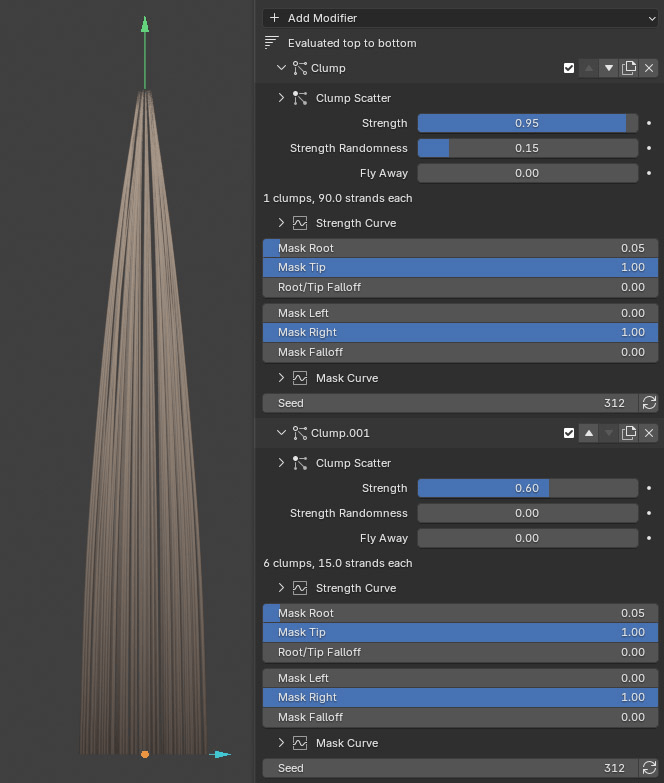
Pulls strands toward shared clump centres.
| Control | What it does |
|---|---|
| Clump Scatter (collapsible) | Lays out the clump centres as their own grid: Width Density, Depth Density, Width/Depth Randomness, Translate X/Y and Clump Seed. |
| Strength / Strength Randomness | How strongly strands are pulled in. |
| Fly Away | Leaves a share of the strands out of the clumps. |
The panel shows how many clumps there are and how many strands each holds. The default Strength Curve gathers mostly the tips; raise the curve early to form distinct locks along the whole strand.
Layers
Section titled “Layers”Splits the bstrand into locks stacked in layers, each layer shorter than the one behind it. Use it for layered haircuts and fur.
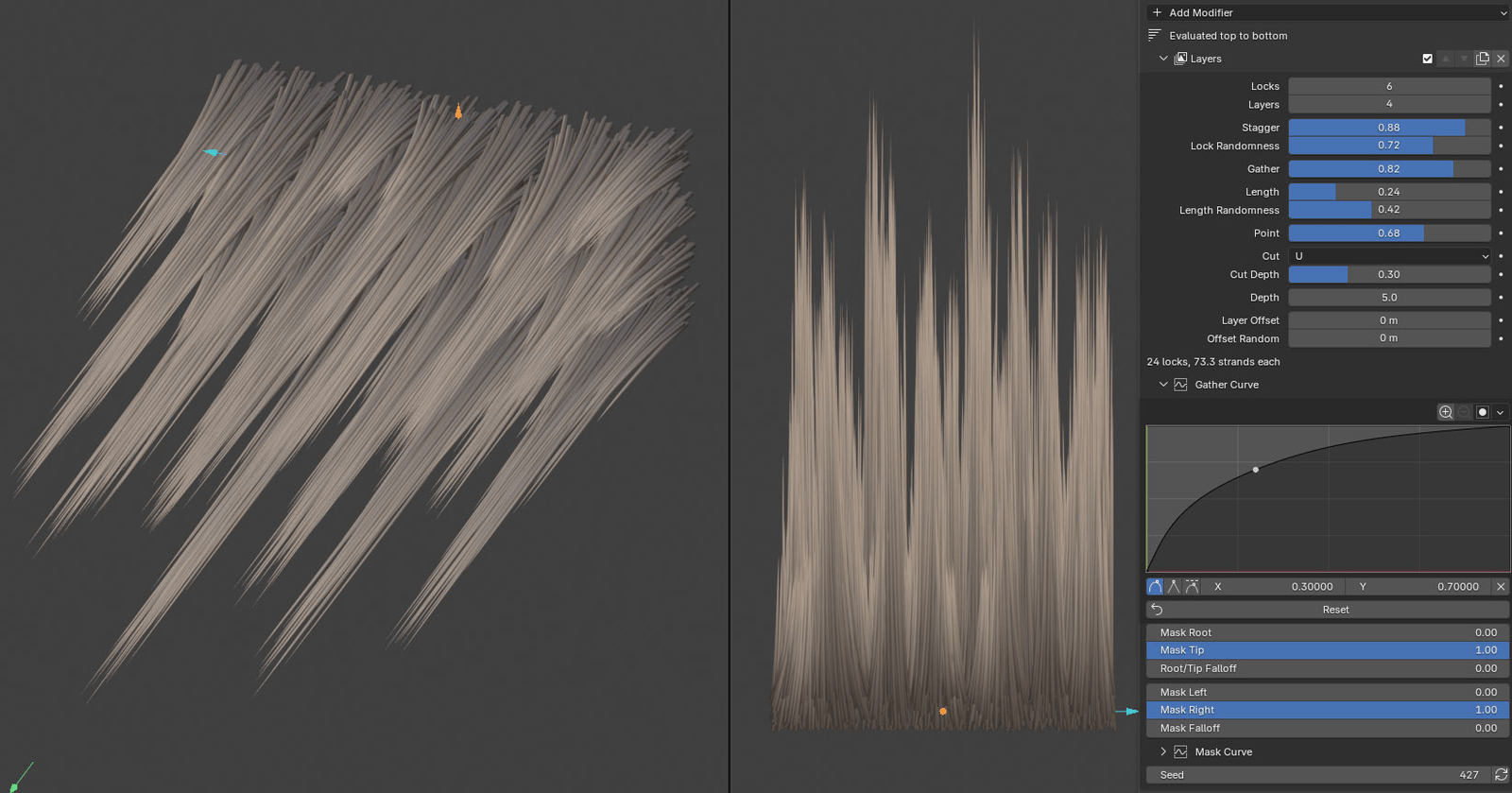
| Control | What it does |
|---|---|
| Locks | Locks across the width, in every layer. |
| Layers | How many layers, back to front through the depth. |
| Stagger | Shifts every other layer half a lock sideways, so front locks cover the gaps. |
| Lock Randomness | Moves each lock’s centre sideways a little. |
| Gather | Pulls each lock’s strands together toward the tip. Gather Curve sets how early. |
| Length | How much shorter the front layer is than the back one. |
| Length Randomness | Cuts each lock to its own length. |
| Point | Cuts the edges of each lock shorter, so it ends in a point. |
| Cut / Cut Depth | The hem shape across the whole bstrand: Straight, V or U, and how deep the V or U is. |
| Depth | Spacing between the layers, in strand widths, so each layer’s edge reads in the baked maps. |
| Layer Offset | Moves each layer’s roots up the strand, so layers overlap like shingles. |
| Offset Random | Moves each lock up or down on top of that. |
Stick Out
Section titled “Stick Out”Grows extra stray hairs that leave the bstrand. The strays live on their own object beside the bstrand, and the position of Stick Out in the stack doesn’t matter.
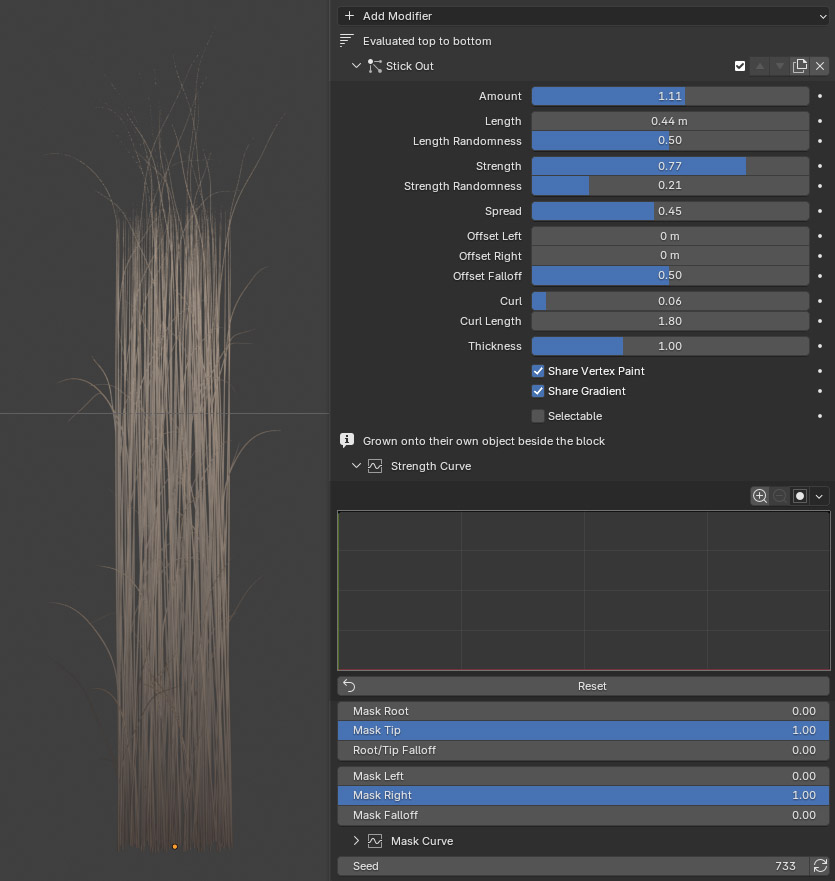
| Control | What it does |
|---|---|
| Amount | How many strays, as a share of the strands: 0.15 is one stray for every seven hairs, 1 is one each, and above 1 there are more strays than hairs. They are extra strands, so a high Amount on a dense bstrand costs rebuild time and fills the atlas. |
| Length / Length Randomness | How long the strays are. |
| Strength / Strength Randomness | How sharply each stray turns away from the hair it grew from. |
| Spread | Randomises the direction they leave in: at 0 they point out of the front and back of the bstrand, at 1 in any direction. |
| Offset Left / Offset Right | Moves the strays on each side outward (or back in). Strays at the edge move the most. |
| Offset Falloff | How far in from the edge those offsets reach. At 0.5 a stray moves by its own distance from the centre; lower moves only the outermost strays, higher brings the ones nearer the middle along too. |
| Curl / Curl Length | Curls the strays, and how many coils they make. |
| Thickness | Stray thickness compared with the hair it grew from. |
| Share Vertex Paint | Strays take their painted colour from the strand they grew out of. |
| Share Gradient | Strays take the root-to-tip gradient colour of the point they grew from, so they match the surrounding hair. |
| Selectable | Lets viewport clicks pick the strays. Off by default, so clicks select the bstrand. |
| Strength Curve | The ramp along each stray, from lying along the hair it grew from (left of the graph) to fully turned away (right). Flat is the straight ramp, so a stray leaves the bstrand evenly; raise the left end and it breaks away at the root, lower it and it follows the hair before flicking out near the tip. |
| Mask Curve | Shapes which part of the bstrand grows strays, across its width, on top of Mask Left / Right. |
Mask Root and Mask Tip set where along each hair the strays sprout: raise Mask Root to keep them out of the roots, lower Mask Tip to keep them off the ends.
Learn from the presets
Section titled “Learn from the presets”The built-in presets are good starting points for reading how a look is built:
| Preset | Modifier stack |
|---|---|
| Soft-waves, Tight-coils, Loose-ringlet | Curl |
| Frizzy | Curl, Noise |
| 3-Braid, 6-Braid-Fishtail | Braid |
| 5-Braid-curved | Braid, Stick Out, Curve |
| Straight-clean | Noise |
| Straight-clump | Clump, Clump |
| Layered-hair | Noise, Layers |
| Short-fur | Curl, Bend, Clump, Noise, Stick Out |
| Layered-fur | Curl, Bend, Layers, Noise, Stick Out |
| Eyebrow | Bend, Noise |
| Eyelash | Bend, Clump |